Halden Ceramics88 Kiln Row, Portland, OR
PP-R-DCJ-10190321Re: not received, $104.00, order HC-85215
HC-000001Exhibit is the dispute desk for small PayPal sellers. It reads each dispute, pulls the order, payment and tracking behind it, and writes the response with every sentence pinned to the record that proves it.
Real sandbox case
PP-R-DCJ-10190321
9 exhibits, 5 sentences, 0 struck. Argued by GPT-5.6 on Azure OpenAI, filed 5 Oct 2026.
Open this caseRe: not received, $104.00, order HC-85215
HC-000001PP-R-DCJ-10190321Not received$104.00
Maya Lindqvist, store order HC-85215
A response that gets one date wrong hands the case to the buyer. So Exhibit never takes the model's word for a fact. Every amount, date, time, tracking number and id in a sentence has to appear in the exhibits that sentence cites, or the sentence is struck before filing.
The model argues. The records decide what it's allowed to say.
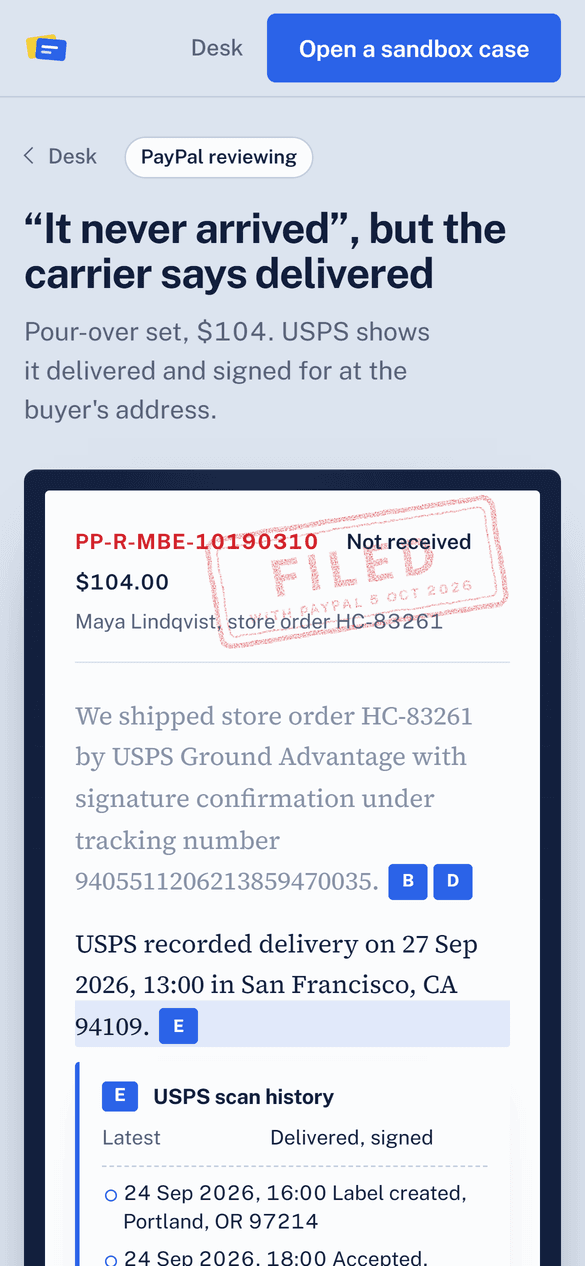
USPS recorded delivery on 27 Sep 2026, 13:00 in San Francisco, CA 94109.E
USPS recorded delivery on 25 Sep 2026, 13:00 in San Francisco, CA 94109.
The case on the desk, as a PayPal reviewer would get it: 9 lettered records. The yellow tab is the buyer's claim. What comes from PayPal is quoted as the API returned it, with its id; what comes from the store says so.
PayPal
PayPal
PayPal
PayPal
Carrier
Store
Store
Store
Store
A buyer disputes a payment. Exhibit reads the case from PayPal: the reason, the amount, the deadline, and what PayPal will accept as a response.
GET /v1/customer/disputes/{id}
It pulls the order, the payment and the issuer's address checks, the tracking on file, the carrier's scans, the emails and the listing. Each becomes a numbered exhibit.
GET /v2/checkout/orders/{id} and /v2/payments/captures/{id}
GPT-5.6 on Azure OpenAI weighs the exhibits, tallies the points for each side, recommends fighting or refunding, and writes the response with an exhibit mark on every sentence.
Azure OpenAI Responses API, one forced function call
Before anything is filed, each amount, date, time and id in the response is matched against the exhibits it cites. Anything unmatched is struck, and you see why.
Runs on Exhibit's server, no model involved
You approve with one click. Exhibit files the evidence with tracking details and a Bates-stamped PDF, or accepts the claim and refunds, through the Disputes API.
POST /provide-evidence or /accept-claim
One multipart call to provide-evidence: the response as notes, the tracking or refund details, and a PDF with the response on page one and every exhibit on its own page, each Bates-stamped HC-000001 onwards, the way exhibits are marked in a filing.
When the call is to refund, it's accept-claim instead, and PayPal refunds the buyer.
Halden Ceramics88 Kiln Row, Portland, OR
Response to PayPal case PP-R-DCJ-10190321
Not received · $104.00 disputed · store order HC-85215 · 5 Oct 2026
We shipped store order HC-85215 to Maya Lindqvist at 1418 Larkin Street, Apt 5, San Francisco, CA 94109. [B]
USPS tracking number 9405511206213859470035 used Ground Advantage with signature confirmation. [D]
USPS recorded delivery on 27 Sep 2026, 13:00 in San Francisco, CA 94109. [E]
The parcel was signed for by M LINDQVIST at the front desk. [E]
When the buyer contacted us, we directed her to check the building’s front desk. [F]
ExhibitsA The buyer's claim: not receivedB The orderC The paymentD Tracking on file with PayPalE USPS scan historyF Emails with the buyerG Listing: Pour-over set, dripper and carafeH Store policy shown at checkoutI This customer's history
HC-000001The buyer's claim: not received
PayPal Disputes API · GET /v1/customer/disputes/PP-R-DCJ-10190321
Cardholder says the merchandise was not received.
USPS scan history
USPS tracking · 9405511206213859470035
24 Sep 2026, 16:00 Label created, Portland, OR 97214
24 Sep 2026, 18:00 Accepted, Portland, OR 97214
25 Sep 2026, 23:00 In transit, Sacramento, CA network distribution center
27 Sep 2026, 07:00 Out for delivery, San Francisco, CA 94109
27 Sep 2026, 13:00 Delivered, signed, San Francisco, CA 94109. Signed for by M LINDQVIST at front desk
Twelve calls, all in the free sandbox with test money. A case is opened, read, argued, filed and ruled on without anyone touching the PayPal website.
Fighting a case you'll lose costs a dispute fee and a customer. When the records point the other way (no tracking, a likely stolen card), Exhibit says so, shows the tally that decided it, and accepts the claim for you with one confirmed click.
Most sellers read a dispute notice on their phone. The brief reads the same there: tap an exhibit letter and the record opens in place under the sentence that cites it; the desk becomes a list of cards.
Open a case and Exhibit takes a real sandbox card payment, ships it, and has the card issuer file a chargeback through PayPal. Then it's on your desk.
Open a sandbox case